How Keywords Impact Resume Parsing
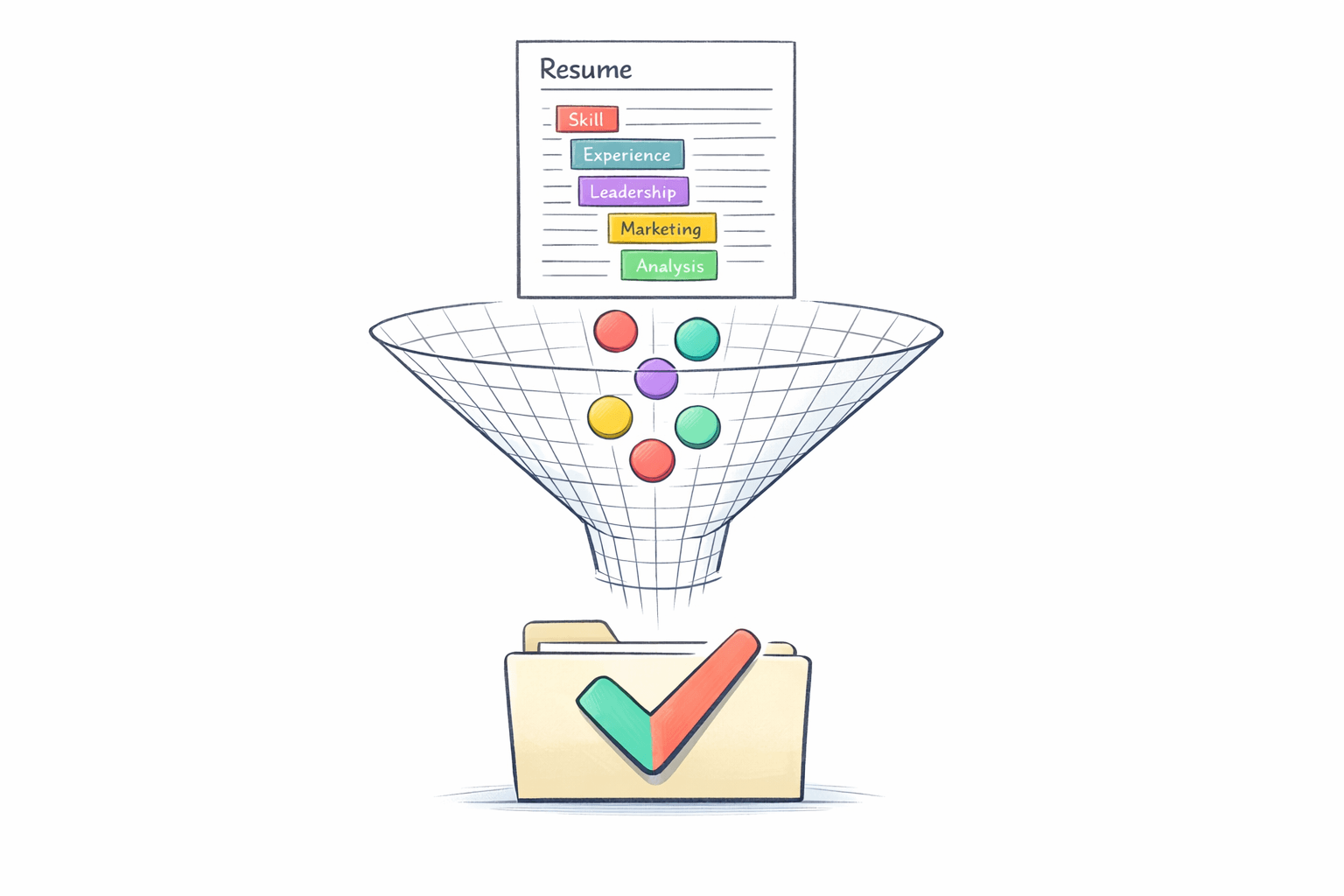
Your resume's success often depends on one thing: keywords. Before reaching a recruiter, most resumes are filtered by Applicant Tracking Systems (ATS). These systems analyze resumes for specific keywords to rank candidates. Here's why this matters:
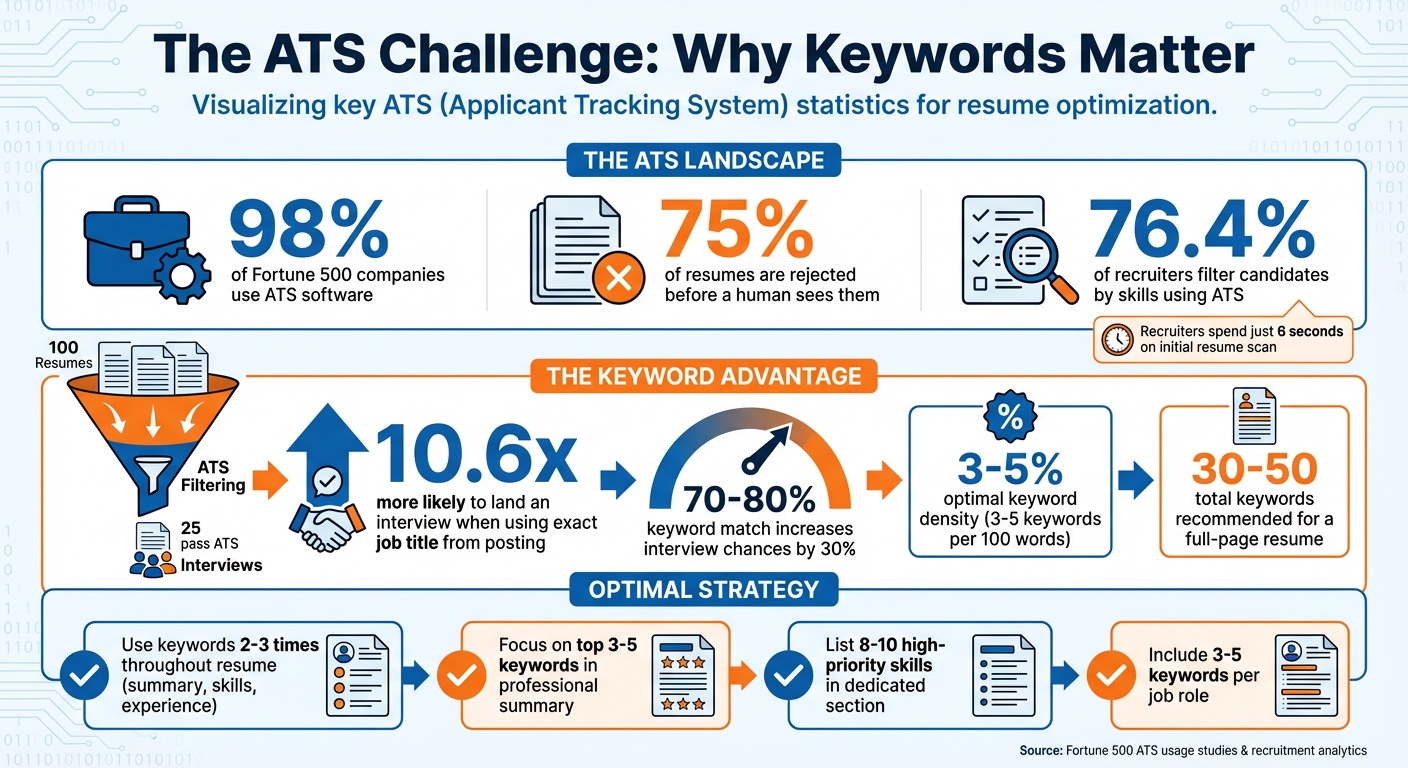
- 98% of Fortune 500 companies use ATS software.
- 75% of resumes are rejected before a human ever sees them.
- Using the exact job title from a job posting makes you 10.6x more likely to land an interview.
ATS systems break down resumes into machine-readable data, scoring them based on keyword relevance. Skills, certifications, and job titles are prioritized. To pass ATS filters, you need to tailor your resume using keywords from the job description, place them strategically, and avoid formatting issues like tables or headers that ATS might not read.
Key Tips:
- Use keywords directly from the job description (e.g., "CRM software" instead of "Salesforce").
- Avoid keyword stuffing - stick to a natural flow with 3–5% keyword density.
- Focus on high-priority sections like your professional summary and skills list.
- Test your resume for ATS compatibility by pasting it into a plain text editor.
ATS Resume Statistics: How Keywords Impact Your Job Search Success
How to Find the Best ATS Resume Keywords
sbb-itb-6487feb
How ATS Systems Detect and Use Keywords
Knowing how an ATS identifies and processes keywords can help you create a resume that clears the digital hurdles. These systems analyze your content, compare it to the job description, and assign scores. This process determines how resumes are ranked and prioritized.
Keyword Matching Methods in ATS
ATS platforms use three main methods to identify keywords in your resume. The simplest is exact matching, where the system searches for word-for-word matches. For example, if a job description lists "Adobe Creative Suite", the system scans for that exact phrase in your resume.
Stemming and normalization take it a step further by reducing words to their base forms and standardizing text for more flexible matching.
Semantic analysis adds a layer of intelligence by interpreting context rather than relying on exact matches. For instance, an ATS can recognize that "managed team of 5 developers" is contextually similar to "led development team of 5". It also identifies synonyms, so phrases like "Python programming", "Python developer", and "Python expertise" are treated as indicators of the same skill set. Some advanced systems even use word embeddings to understand conceptual links between terms, assigning relevance scores based on how closely your experience aligns with what the recruiter is looking for.
"Modern ATS systems understand context and synonyms. Your resume should read naturally to humans first - that's what makes it effective for both machines and recruiters".
How Keywords Affect Candidate Ranking in ATS
Once keywords are detected, ATS systems calculate a relevance score to rank candidates. Proximity scoring evaluates where keywords appear in your resume. Keywords located near job titles, within bullet points, or in dedicated skills sections are weighted more heavily than those buried in lengthy paragraphs.
The system also uses sectional weighting, prioritizing keywords found in your professional summary and skills sections over those in your work experience or education. Repeated mentions of critical skills, certifications, or technical tools can further boost your ranking since these are more easily verified. Additionally, when a keyword appears multiple times in the job description, the ATS flags it as a high-priority requirement, favoring resumes that include it.
Studies show that resumes with a 70–80% keyword match to the job posting are 30% more likely to lead to an interview. Furthermore, 76.4% of recruiters filter candidates by skills using their ATS. This explains why 75% of resumes are rejected before a human even sees them - they simply don’t score high enough in keyword relevance to make the cut. This highlights the importance of strategically placing keywords, a topic we’ll explore in more detail in the next section on resume optimization.
How to Optimize Keywords in Your Resume
Effectively using keywords in your resume means picking the right terms, placing them strategically, and using them just enough to make an impact without overdoing it. Here's how to get it right.
Finding Keywords in Job Descriptions
The best place to find relevant keywords? The job posting itself. Start by converting the job description into plain text to remove any hidden formatting. Then, focus on terms that are repeated three or more times - they're likely the most important.
Pay close attention to sections like "Requirements" and "Qualifications", as well as the opening and closing sentences of each paragraph. These areas often highlight what the employer values most. Look out for bolded text, capitalized words, or bulleted headings - these formatting cues often point to must-have skills or attributes.
Once you've identified key terms, organize them into three groups:
- Hard skills: Examples include Python, SQL, or Adobe Creative Suite.
- Soft skills: Think leadership, teamwork, or problem-solving.
- Certifications or education: This could include credentials like PMP or degrees like an MBA.
When adding these to your resume, use the exact wording from the job description. For instance, if the listing mentions "CRM software", don’t replace it with a specific brand name like Salesforce; older applicant tracking systems (ATS) might not make the connection. Also, include both full terms and abbreviations (e.g., "Master of Business Administration (MBA)") to ensure the system picks up on your qualifications.
Where to Place Keywords in Your Resume
Where you put keywords matters just as much as the words themselves. ATS algorithms often prioritize terms that appear early in your resume, so start strong.
Include the exact job title from the posting near the top of your resume, right after your contact details. In your professional summary, aim to use your top 3–5 keywords within the first couple of sentences. Follow this with a "Core Competencies" or "Technical Skills" section, where you can list 8–10 high-priority hard skills, tools, or certifications.
When detailing your work experience, weave in 3–5 keywords per role, tying them to measurable outcomes. For example, instead of just listing a skill, say something like, "Used Google Analytics to increase organic traffic by 45%." However, avoid placing keywords in tables, text boxes, or headers/footers - many ATS systems can’t read content in those areas.
Once you've positioned your keywords, review their frequency to ensure a natural flow.
How Often to Use Keywords
Striking the right balance is crucial. Aim for a keyword density of 3–5%, which means 3–5 keywords per 100 words. For a typical full-page resume, this translates to around 30–50 keywords in total. Going beyond 5% could backfire, as some ATS systems penalize keyword stuffing.
For your most important keywords, try to include them 2–3 times throughout your resume - once in your professional summary, once in your skills section, and once in your work experience. To keep things fresh, use variations or synonyms where appropriate. For instance, alternate between "Python programming" and "Python developer" to show relevance without sounding repetitive. This approach not only helps ATS systems but also makes your resume more appealing to recruiters, who often spend just six seconds on an initial scan.
Common Keyword Mistakes to Avoid
Even with the perfect keywords, certain missteps can jeopardize your ATS (Applicant Tracking System) score. These mistakes might cause your resume to get rejected by the system or even flagged as unprofessional by recruiters.
Keyword Stuffing and Why It Backfires
Keyword stuffing happens when you cram too many keywords into your resume, making the language clunky and unnatural. For instance, repeating "social media" five times in one sentence not only sounds awkward but also raises red flags for recruiters. A tech recruiter once shared:
"When I see a resume where there's this giant block of all the technologies you've used, you're not an expert in all of those. Yeah, you might have written Javascript for 3 months back in 2005, but that doesn't mean you're a Javascript developer."
Listing every skill without context can come across as disingenuous. Plus, ATS systems often flag resumes with excessive keyword density as spam. Since 75% of large companies now rely on AI to filter resumes, overloading your resume with keywords can hurt your chances of making it through the first round.
Misusing Keywords: Inconsistencies and Generic Terms
Using the wrong version of a keyword can lower your ATS score because many systems still prioritize exact matches over synonyms. For example, if a job description specifies "Content Writer" but your resume says "Content Creator", the ATS might not register it as a match. Job titles hold particular weight in ATS algorithms, making precision a key factor.
Buzzwords like "team player" or "highly motivated" can also work against you. These vague terms lack the specificity recruiters are looking for. Considering that 76.4% of recruiters use ATS filters to screen for specific skills, it’s important to use clear, descriptive language. Similarly, relying solely on acronyms like "SEO" without also including "Search Engine Optimization" could mean the system overlooks your resume entirely. These inconsistencies, along with formatting errors, can significantly impact your ATS performance.
Hidden Text and Formatting Errors
Some applicants try to hide keywords in white text, hoping to game the system. However, modern ATS software converts resumes to plain text, exposing these tactics to recruiters. Stephen Greet, Co-founder of BeamJobs, cautions:
"ATS systems have evolved to flag these tricks [invisible keywords], and recruiters see it as a red flag for authenticity."
Formatting issues like text boxes, tables, headers, footers, two-column layouts, or creative section titles like "Career Journey" instead of "Work Experience" can also confuse ATS software. For example, placing your contact information in a header might prevent the system from properly associating it with your application. These errors can cause keywords and key details to be overlooked, directly lowering your ATS score.
To test if your resume is ATS-friendly, paste it into a plain text editor like Notepad. If the text looks scrambled or incomplete, the ATS might encounter the same issues. Stick to standard fonts like Arial or Calibri, use a single-column format, and save your file as a .docx, which works with 98% of ATS systems - unless the employer specifically requests a PDF.
Avoiding these common pitfalls ensures your resume is properly parsed and increases its effectiveness in ATS systems. Once you’ve addressed these issues, you can use tools like JobLogr to further refine your resume.
How JobLogr Helps Optimize Keywords for ATS
JobLogr tackles common challenges with Applicant Tracking Systems (ATS) by making resume keyword optimization straightforward and effective. Acting as a comprehensive career assistant, JobLogr combines resume optimization, job discovery, and application tracking into one platform. Using machine learning and natural language processing, it analyzes job descriptions to extract crucial keywords, skills, and formatting tips. These features align perfectly with established ATS optimization strategies.
JobLogr's Resume Analysis Feature
The Resume Analysis tool in JobLogr scans your resume to pinpoint relevant keywords and simulates how ATS software would parse it. By leveraging semantic parsing and frequency weighting, the tool highlights essential skills and terms. It also offers contextual mapping to suggest synonyms and industry-specific jargon. For instance, if your resume mentions "Agile", the tool might recommend adding "Scrum" to capture related search terms. It also addresses issues like keyword stuffing or hidden formatting, ensuring your resume adheres to ATS best practices. By comparing your resume against specific job descriptions, JobLogr identifies missing keywords recruiters often search for and offers guidance on placing them strategically in sections like your Professional Summary or Core Competencies.
Tailoring Resumes for Specific Jobs
JobLogr goes beyond keyword identification by helping you customize your resume for individual job postings. Its AI tools analyze job descriptions in detail, using semantic parsing to extract high-value terms - nouns, verbs, and adjectives that reflect key responsibilities and qualifications. The result? A real-time match score that identifies missing skills, certifications, or tools, giving you actionable insights to boost your ATS ranking. Additionally, JobLogr's AI-powered rewriting feature enhances your resume's bullet points using the STAR method, creating keyword-rich and compelling content that stands out.
Pricing and Plans
JobLogr offers a 7-day free trial, backed by a money-back guarantee if the platform doesn't improve your job search experience. For $20/month, the Premium plan unlocks advanced features like AI Resume Scoring, Cover Letter Generation, and an aggregated job search engine that scans platforms like LinkedIn, Indeed, and ZipRecruiter. These tools can increase interview rates by up to 70% while cutting job search time from over 10 hours a week to less than one hour. Premium subscribers also gain access to salary benchmarking tools with real-time market insights, helping you evaluate compensation expectations effectively.
Conclusion
Keywords are more than just industry jargon - they're critical data points that can make or break your chances of getting your resume in front of a human recruiter. With a large number of resumes failing to pass the initial ATS screening, mastering keyword optimization has become a necessity. It’s the dividing line between landing an interview and being filtered out.
Studies emphasize the importance of precise keyword matching. For instance, aligning your job title with the one in the posting makes you 10.6 times more likely to secure an interview. Additionally, 76.4% of recruiters use skills-based filters. This underscores the need to tailor your resume to reflect the exact terms used in the job description. Use both acronyms and their full forms (e.g., "Search Engine Optimization (SEO)") and carefully weave keywords into your resume to ensure they align with what ATS algorithms prioritize and what hiring managers value.
"Your resume needs to speak the ATS language before it can speak to a hiring manager." - Adam, Resume.AI
Strategic keyword placement significantly boosts your resume's effectiveness. Focus on areas like your professional summary and skills section, as these carry more weight than keywords buried in job descriptions. Avoid formatting pitfalls such as tables, headers, or graphics that ATS systems struggle to process. Aim for a keyword density of 3–5% - enough to satisfy the algorithm without setting off spam filters - and stick to ATS-friendly formatting to maximize your chances.
FAQs
What can I do to make my resume ATS-friendly?
To ensure your resume gets through an applicant tracking system (ATS), focus on simple formatting, include relevant keywords, and organize your content for easy scanning. Start by studying the job description carefully. Pull out key terms and phrases that align with your skills and experience, and weave them naturally into your resume.
Keep the layout clean - avoid intricate designs, graphics, or uncommon fonts, as these can confuse ATS software. Save your resume in a widely accepted format, like .docx or PDF (if requested), to avoid compatibility issues. By optimizing your resume for ATS, you improve your chances of making it past the initial screening.
What are some common keyword mistakes to avoid in your resume?
To create a resume that stands out and works seamlessly with Applicant Tracking Systems (ATS), steer clear of these common keyword pitfalls:
- Keyword stuffing: Packing your resume with too many or irrelevant keywords not only makes it hard to read but could also lead to ATS flagging it negatively.
- Poor keyword placement: If you place crucial keywords in headers, footers, or within graphics, ATS software might fail to recognize them entirely.
- Ignoring job descriptions: Skipping the step of tailoring your resume to include keywords from the job description can significantly lower your chances of clearing ATS filters.
Instead, aim to integrate relevant keywords naturally throughout your resume. Make sure these keywords align closely with the job description to ensure your resume catches the attention of both ATS systems and hiring managers.
How do keywords affect how ATS systems evaluate resumes?
Applicant Tracking Systems (ATS) work by scanning resumes for keywords that align with the job description. Resumes that include these keywords in key sections - like skills, work experience, and the summary - are more likely to rank higher and make it past the initial screening.
To boost your chances, use the exact terms from the job posting, but keep it natural. Don't stuff your resume with keywords to the point where it feels forced. Strive for a balance that ensures your resume is both ATS-friendly and easy for human recruiters to read.